Create a Buzz with a Smartphone Birthday Invite Template
There’s a specific kind of panic that sets in a week before a birthday party when the physical invitations still haven’t been mailed. Between the cost of postage, the risk of mail delays, and the environmental footprint, the traditional paper invite often feels like a relic of a different era. We live in a world where our primary communication device is in our pocket, yet we often complicate the event planning process by adhering to outdated methods. Enter the Smartphone Birthday Invite—a digital solution designed not just to save time, but to elevate the way we celebrate.
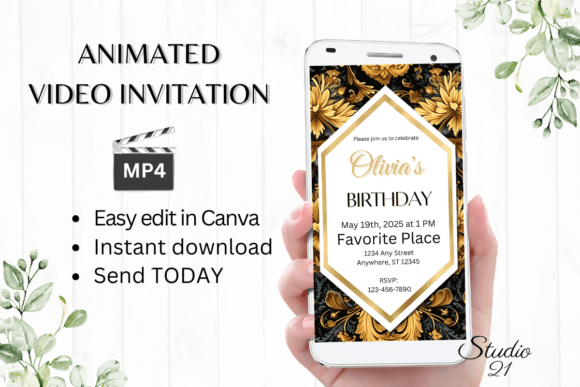
This isn't just about sending a text message that says "Party at 7 PM." We are talking about a sophisticated, animated video invitation template that mimics the sleek interface of a mobile device. It’s a piece of modern typography and motion design combined, offering a premium experience that arrives instantly in your guest's inbox or chat window. For the creative entrepreneur, the busy parent, or the design-savvy individual, this approach bridges the gap between professional presentation and personal touch.
Why Motion and Mobile-First Design Matter
Static images often get lost in the scroll. However, video content commands attention. When a user opens a message and sees an animation that looks like a smartphone screen lighting up with an invitation, it triggers a psychological response. It feels native to the platform. This is the power of using a Smartphone Birthday Invite; it leverages the medium we use most to deliver the message.
From a design perspective, this template style utilizes a specific aspect ratio (1080 x 1920 px) optimized for vertical viewing. This is crucial for modern web design and social media graphics. When you design for the vertical screen, you are designing for how people actually hold their devices. The template provided allows for immediate access via Canva, meaning you don’t need to be a motion graphics wizard to create something that looks like a high-end marketing asset. You simply edit the text, adjust the colors to match your party theme, and export.
Practical Applications Beyond the Party
While the primary use case is a birthday celebration, the versatility of this digital template extends into various creative and commercial avenues. If you are a small business owner or a content creator, understanding how to repurpose assets is key to efficiency.
Consider the branding potential. If you run a boutique, a salon, or a creative agency, hosting an anniversary event or a launch party requires a specific aesthetic. Using a digital animated invitation helps maintain visual consistency across your brand identity. You can match the font styles and colors of the invite to your existing logo and website, reinforcing brand recognition before the event even starts.
Here are a few ways to leverage this style of digital invite:
- Product Launches: Send a "You're Invited" video to your email list to generate hype for a new drop.
- Client Onboarding: Adapt the template to create a welcoming "digital handshake" video for new clients, sent via WhatsApp or Messenger.
- Social Media Events: Use the MP4 file as an Instagram Story or Reel to invite followers to a live stream or Q&A session.
- Exclusive Sales: Create a "VIP Access" pass that looks like a smartphone notification to send to your top customers.
Mastering Typography and Readability
A major component of the Smartphone Birthday Invite is the typography. Because the design mimics a screen, the font choice is critical. The template typically utilizes sans serif fonts for a clean, modern look that mirrors user interface (UI) text, but it often pairs this with a script font or handwritten font for the main headlines to add a personal, celebratory feel.
When you edit the template in Canva, you have the freedom to change font styles, sizes, and colors. This is where your design sensibility comes into play. If you are creating an invite for a child’s party, you might opt for a playful, rounded display font. For a sophisticated 30th birthday, a sleek serif font or a bold modern typography style works best.
Readability considerations are paramount in motion graphics. Because the text might be animated (fading in or sliding up), you need to ensure the contrast is high enough to be read quickly. Avoid thin, light-colored fonts on bright backgrounds. The beauty of this template is that it handles the animation timing for you, but you still need to ensure the content is legible on small screens. Always preview your animation on your own smartphone before sending it out to ensure the readability holds up on a mobile device.
The Technical Edge: Speed and Distribution
One of the greatest barriers to good design is often the technical overhead. Historically, creating an animated video required software like After Effects and a steep learning curve. This template democratizes the process. By using Canva, a platform familiar to most designers, marketers, and hobbyists, you remove the friction.
The workflow is streamlined for speed:
- Download and Access: You receive a PDF with a direct link. No software installation, no font licensing headaches (Canva handles the fonts included in the template).
- Personalize: Swap out the placeholder text. If you want to change the animation style—perhaps making a text element bounce rather than fade—you can do that with a few clicks.
- Export and Share: Download the file as an MP4. This format is universally compatible. You can attach it to an iMessage, send it via email, or upload it to a Facebook Event page.
This immediacy is a game-changer for editorial layouts and digital products. Imagine you are a blogger hosting a last-minute meetup. You don't have time to design from scratch. You open the template, edit the details, and have a professional-grade video asset ready to distribute in under ten minutes.
Choosing the Right Style for Your Audience
Not all invitations are created equal, and the "vibe" of your video needs to match the expectations of your audience. When selecting a Smartphone Birthday Invite template, look at the color palette and the motion style.
If your audience is young and energetic, look for templates with bold colors and fast-paced transitions. If you are targeting a more mature or professional crowd for a corporate mixer or elegant dinner, look for templates that utilize a muted color scheme and slower, more graceful animations.
Think about packaging design principles applied to digital media. Your invitation is the "packaging" for your event. It sets the tone. Just as you wouldn't put a luxury product in cheap packaging, you shouldn't send a generic text for a milestone event. The inclusion of high-quality design assets—like subtle background textures or glossy "glass" effects that mimic a real phone screen—adds a layer of perceived value that makes the recipient feel special.
Commercial Licensing and Creative Freedom
For the creative entrepreneur or small business owner, the utility of these templates often extends beyond personal use. If you are an event planner or a virtual assistant, you can use these templates to create invitations for your clients.
It is important to note that while the template allows for extensive editing, you are working within the Canva ecosystem. This is a massive advantage because it means you can collaborate. You can share the editable link with a client or a co-host and allow them to input their specific details, saving you the back-and-forth of email chains.
Furthermore, the ability to download as an MP4 means you own the final output. You can archive these videos, use them in "Year in Review" montages, or compile them for merchandise content later. The flexibility of the format ensures that your creative work isn't siloed in one specific platform.
Elevating the Everyday
We often reserve "good design" for big corporate projects, but there is immense value in bringing that same level of care to personal milestones. A Smartphone Birthday Invite does more than just convey information; it creates an atmosphere. It tells your guests, "I care about this event, and I care about your experience of it."
Whether you are a designer looking for a quick mockup idea, a marketer needing a fast event asset, or a parent wanting to impress other parents, the ability to edit, animate, and send a professional video invitation from your phone or laptop is a powerful tool. It blends the convenience of modern technology with the timeless joy of gathering together. By focusing on clean typography, intuitive editing, and high-quality output, you ensure your message isn't just seen—it's remembered.