Mastering the Annual Report: A Designer's Guide to Professional Brochures
Every seasoned designer knows the sinking feeling of presenting a major project on subpar materials. Whether it is a pitch for a new client or the end-of-year wrap-up for a shareholder meeting, the medium is just as critical as the message. A brilliant strategy can fall flat if it is wrapped in a generic, uninspired layout. This is where the distinction between an amateur attempt and a corporate standard becomes glaringly obvious. When you are tasked with delivering an Annual Report or a high-stakes Project Proposal, you aren't just handing over a stack of papers; you are presenting a narrative of your business's success, stability, and future trajectory.
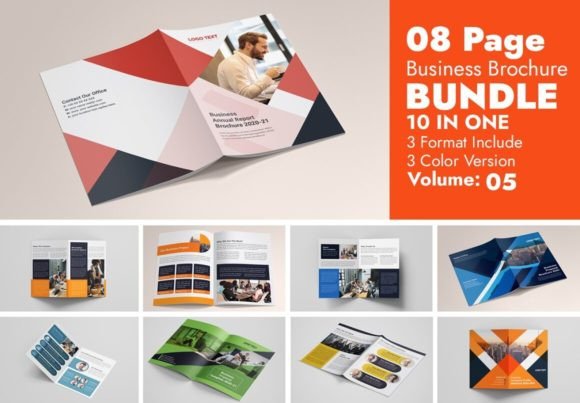
The challenge, however, is rarely the content itself. Most entrepreneurs and business owners have the data, the charts, and the text ready to go. The bottleneck usually lies in the execution. How do you take dense financial information, operational updates, and future roadmaps and make them visually digestible? How do you ensure that the document feels cohesive, branded, and "print-ready" without spending weeks tweaking margins and color codes? This is the exact problem that specialized design assets, such as the Annual Report Business Brochure template, are built to solve.
The Anatomy of a Persuasive Proposal
A project proposal is fundamentally an argument. You are arguing that you have the expertise, the plan, and the resources to solve a specific problem for a client. However, psychology plays a massive role in how that argument is received. A proposal designed in a standard word processor often subconsciously signals "effort" rather than "professionalism." In contrast, a proposal laid out using a structured, multi-page brochure template signals that you understand the value of presentation and, by extension, the value of the client's time.
Consider the features that define a high-quality template like the one mentioned above. It isn't just about having a pretty cover page. It is about the process. A robust template includes specific sections designed to guide the reader through the implementation steps, resource allocation, and management strategies. It transforms a chaotic list of ideas into a structured roadmap. When a client sees a well-organized "Project Features" section—clearly delineating the volume of work, the design specifications, and the deliverables—they feel a sense of security. They know exactly what they are getting.
Furthermore, the technical specifications matter more than most people realize. Working with a template that is set up in Adobe Illustrator with CMYK color modes and proper bleed settings (like the standard 0.125 inches) ensures that what you see on your screen is exactly what comes out of the printer. There is nothing worse than a pixelated logo or a background color that stops abruptly at the edge of the paper. Professional templates remove these technical headaches, allowing you to focus on the narrative.
Visual Consistency and Brand Identity
For small business owners and content creators, brand identity is everything. It is the thread that connects your Instagram feed to your website, your business cards to your email signatures. When you use a disjointed set of tools for your print materials, you risk diluting that identity. A premium font or a specific color palette that looks great on a website might look completely different on paper due to color conversion issues.
This is why the "Easy To Customize" aspect of professional brochure templates is vital. Imagine you have a specific brand hex code for your primary color. In a poorly constructed file, changing the color might mean manually selecting every shape and text box, risking inconsistency. In a professionally structured Adobe Illustrator file, you can often change the global color theme in a few clicks, ensuring that your entire 10-page report updates instantly to match your brand identity.
This level of visual consistency builds trust. When a potential investor or client flips through your annual report, they shouldn't be distracted by shifting fonts or clashing colors. They should be immersed in your content. The typography should be legible—often utilizing a mix of a strong sans serif font for headlines and a clean serif for body text—to guide the eye naturally from the executive summary to the financial data. It’s about creating a seamless reading experience that feels intentional and curated.
Practical Applications Beyond the Boardroom
While the name suggests a focus on annual reports, the utility of a high-quality business brochure extends far beyond year-end summaries. These templates are versatile assets for a variety of scenarios.
For freelancers and agencies, this structure is perfect for "Scope of Work" documents. Instead of sending a plain PDF, you can present your service packages, timelines, and case studies in a visually rich format. For product-based businesses, the same layout principles apply to lookbooks or wholesale catalogs. You can showcase high-resolution imagery of your merchandise alongside specifications and pricing tiers.
Even in the realm of digital marketing, these templates serve a purpose. While they are print-ready, they can easily be adapted for digital distribution. A lead magnet, such as an industry report or a whitepaper, gains significantly more perceived value when it is formatted as a designed brochure rather than a plain text document. It positions you as an authority in your niche.
Consider these practical use cases where a structured template saves the day:
- Grant Proposals: Non-profits often need to present data and mission statements in a compelling way to secure funding.
- Event Programs: Whether for a conference or a gala, a well-designed program outlines the schedule, speakers, and sponsors professionally.
- Internal Handbooks: Onboarding new employees with a beautifully designed handbook makes the company culture feel more established and welcoming.
Mastering Typography and Layout in Adobe Illustrator
One of the most common hurdles for non-designers is typography. Choosing the right typeface can be paralyzing. A good template removes this guesswork by providing a curated selection of free fonts that have already been tested for readability and aesthetic harmony. However, understanding why those fonts work is still useful.
When editing your brochure, pay attention to the font pairing. Most professional layouts use contrast to create hierarchy. If the header is a bold, geometric modern font, the body text might be a classic, readable serif. Avoid using more than two or three typefaces in a single document to prevent visual clutter. Also, take advantage of the "Paragraph Styles" feature included in high-end templates. This allows you to define the look of your headers, sub-headers, and body text once, and then apply it with a single click throughout the document. It ensures that if you decide to increase the font size of all body text from 10pt to 11pt, you don't have to do it manually for every single page.
Additionally, don't underestimate the power of white space. It is tempting to fill every inch of the page with text or images to justify the cost of printing. Resist this urge. White space (or negative space) gives the reader's eyes a place to rest and makes the content feel more accessible. It draws attention to the most important elements, such as a key statistic or a call to action.
Streamlining Your Workflow
Time is the most valuable resource for any entrepreneur. Building a 10-page brochure from scratch in Adobe Illustrator is a time-consuming task that requires an understanding of master pages, grid systems, and print standards. By starting with a pre-structured template, you are effectively buying time.
Imagine you need to deliver a proposal to a potential client by Friday. Without a template, you might spend Monday and Tuesday setting up the file, Wednesday writing the content, and Thursday trying to fix alignment issues. With a ready-to-use asset, you can skip straight to the content. You simply replace the placeholder text with your own, swap the stock images for your product photos, and adjust the colors to match your brand. The heavy lifting of layout and design has already been done by a professional.
This efficiency doesn't just save time; it reduces stress. Knowing that your file is set to the correct dimensions (A4 or 8.5x11 inches) with the proper bleed settings means you can send it to the printer with confidence. You aren't guessing if the margins are safe or if the resolution is high enough. You are simply executing a proven system.
Final Thoughts on Professional Presentation
In a competitive market, the details are what set you apart. A well-crafted Annual Report or Project Proposal does more than just convey information; it tells a story of competence. It signals to your clients, investors, and partners that you care about quality in every aspect of your business.
Whether you are a designer looking to streamline your client deliverables, a small business owner preparing for a crucial pitch, or a marketer putting together a comprehensive brand guide, investing in high-quality design assets is a strategic move. It bridges the gap between a great idea and a professional execution. By leveraging tools like structured Adobe Illustrator templates, you ensure that your visual communication is as strong as your business strategy. The goal is to make your work look effortless, even when you know just how much thought went into every page turn.